
Your legacy Nintex migration,
mapped.
If your team has already decided to move off legacy Nintex, this guide is for you. It brings the deadlines, the realistic platform options, and what a migration actually involves into one place, each point sourced to Microsoft, Nintex, and practitioners who have already made the move.
All milestones in effect
The retirement schedule has now fully reached its active phase.
-
Microsoft permanently removed the engine The SharePoint 2013 workflow engine left every existing Microsoft 365 tenant on April 2, 2026. That engine is what legacy Nintex ran on. Microsoft Source
-
Support ended Dec 2025 Nintex Workflow for Office 365 reached end of support on December 31, 2025. No further patches or fixes. Nintex Source
-
No one-click conversion Content tools move your data. You rebuild the workflow logic and forms by hand. There is no simple migration path. Nintex FAQ
-
An open destination With a rebuild required either way, the destination is an open decision. Power Automate, Nintex's modern cloud, WEBCON and others each fit different needs.
-
Not everyone moves today Modern Nintex Automation Cloud and most on-premises setups fall outside this particular deadline for now.
-
Strategic Window This is an opportunity to clean house. Retiring "ROT" (Redundant, Obsolete, Trivial) workflows can save months of effort.
A guide for teams already on the move
This resource assumes the decision to migrate off legacy Nintex has already been made. It focuses on planning and running that migration well, not on making the case for it.
This guide is for you if
- checkYou have already decided to move off legacy Nintex, and now need to plan and run the migration.
- checkYou are the IT or platform lead, a SharePoint or Nintex administrator, an enterprise architect, or the person accountable for the project.
- checkYou want the deadlines, the platform options, and the realities of migration in one sourced place.
It's less relevant if
- removeYou are still deciding whether to move at all. This guide does not argue that case.
- removeYou run modern Nintex Automation Cloud, which the 2026 deadline does not affect.
- removeYou are looking for a product pitch rather than a neutral, sourced reference.
The Complete Nintex
Exit Playbook
Discovery and ROT triage, complexity scoring, platform mapping against runtime and compliance constraints, and phased cutover runbooks. Written for teams running the whole migration, not just reading about it.
Get the playbook
Enter your work email and it opens immediately, no waiting on a follow-up.
By submitting, you agree to be contacted about this. See our Legal & Disclaimers.
No spam. Unsubscribe anytime.
Which Nintex products are affected by the 2026 changes?
"Nintex" is not a single product. The 2026 retirement affects some versions directly and leaves others untouched. Identify your setup below to understand where your organisation stands.
...
Get the full report as a PDF
A migration brief tailored to your exact setup: every deadline that applies to you, your realistic options, and a workflow-inventory template to start your triage. Sent straight to your inbox.
By submitting, you agree to be contacted about this. See our Legal & Disclaimers.
Verified work emails preferred. Unsubscribe anytime.
Every deadline that matters
These are the dates that decide when things stop working. Microsoft and Nintex control every one of them, and each row links to the primary source so you can confirm it yourself.
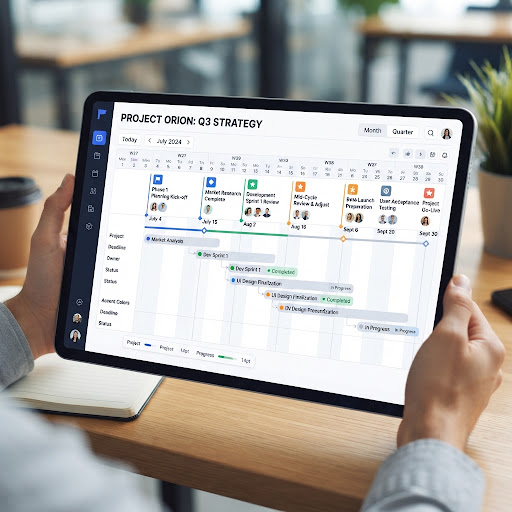
The 12-Month Reality
A typical migration project spans 12 months, phasing from initial audit to final user acceptance testing. The deadlines shown below represent the absolute hard stops determined by Microsoft and Nintex.
Months 1-2: Comprehensive Audit & ROT Analysis
Months 3-8: Technical Reconstruction & Re-architecting
Months 9-12: Testing, Training & Final Cutover
SharePoint 2013 engine switched off for new tenants Microsoft
New Microsoft 365 tenants can no longer build workflows on the legacy 2013 engine, the same engine Nintex Workflow for Office 365 depends on.
SharePoint Add-Ins blocked for new tenants Microsoft
As Microsoft retires the SharePoint Add-In model, new tenants lose the add-in support that older Nintex Forms structures rely on.
Nintex Workflow for Office 365 reached end of support Nintex
No further patches, security updates, or troubleshooting from Nintex. Running past this date means operating unsupported software.
The hard stop: engine removed from existing tenants Microsoft
Complete removal of the SharePoint 2013 workflow engine from all existing M365 tenants. Dependent workflows fail permanently, and old definitions become viewable only as raw XML.
What's driving the 2026 move
You've made the decision to migrate. This section covers the context behind that decision and the factors worth carrying into your planning, each attributed to its source.
The deadline leaves no choice
For teams on Nintex Workflow for Office 365, the Microsoft retirement schedule is an operational hard stop. Procurement, onboarding, IT requests, and approval flows built on the legacy engine simply stop working once it's removed on April 2, 2026.
Pricing models to plan for
Even Nintex's server-based licensing has long capped usage. Moving to modern cloud platforms changes how that gets metered: consumption- or user-based models with overage fees. Buyers report sharp increases against historical baselines.
Technical factors to weigh
Administrators cite friction in the cloud platform: workflows keyed to display names, hybrid gateway HA challenges, and hard file/size limits. These are practitioner reports, not universal facts, but they drive migration choices.
A rebuild is required either way
There's no one-click conversion between the legacy engine and any modern platform, Nintex's own included. Once a full rebuild is unavoidable, the extra cost of switching vendors entirely drops sharply, encouraging market evaluation.
Reasons some organizations stay
Not everyone leaves. Nintex offers supported paths to its modern products with upgrade tooling and migration assistance. If your team already knows the Nintex stack and can absorb the licensing model, staying in-platform can be the lowest-effort route. Nintex Source
The honest version: the right move depends on your complexity, budget, and skills. It does not depend on any single vendor's framing.
Where teams are heading next
These are the main directions teams evaluate, described by fit and trade-off rather than ranked. The right destination depends entirely on your requirements.
Microsoft Power Automate
A common path for organizations already invested in Microsoft 365. It uses a different logical model, so you rebuild workflows rather than translate them.
Nintex Automation Cloud
Nintex's own modern products, with vendor-provided upgrade tooling. Familiar to existing Nintex teams, though still not a lift-and-shift.
Dedicated process platforms
Platforms such as WEBCON use state-machine engines built for long-running, multi-stage approvals, sits closer in spirit to legacy Nintex.
SharePoint-native replacements
Tools such as Crow Canyon NITRO Studio keep data inside your existing SharePoint/M365 boundary, critical for sovereignty.
“Power Automate's biggest structural weakness at enterprise scale is fragmentation.”
How to choose the right platform
Don't start from a product. Start from your requirements, and score every candidate against the same questions.
Neutral selection criteria
If a platform can't answer these to your satisfaction, it's not your platform, no matter who recommends it.
-
1How long do your longest-running workflows and approvals need to stay open?
-
2Is your pricing predictable at your real transaction volume, including overages?
-
3Where must your data physically live for compliance?
-
4Who maintains these workflows, citizen developers or professional developers?
-
5How many workflows are genuinely active versus redundant or obsolete?
-
6What integrations and forms must survive, and how are they rebuilt?
-
7What's the total effort to rebuild, test, and retrain, not just to license?
-
8What's your exit cost if this platform's terms change later?
What a migration actually involves
A structured, phased approach that puts continuity ahead of speed. The early phases exist to de-risk the later, expensive ones.
Discovery & inventory
Scan the tenant to catalog every active and legacy workflow before assuming anything about scope.
Triage & ROT analysis
Identify redundant, obsolete, and trivial workflows that haven't run recently, then retire them instead of migrating them.
Logic auditing
Analyze workflow definitions to score complexity and flag custom scripts or actions that won't have a direct equivalent.
Architectural mapping
Assign each surviving workflow to a target platform based on runtime limits and compliance.
Core data migration
Move lists, libraries, and permissions with content tools. Note: these move data, not logic.
Workflow reconstruction
Rebuild logic on the new engine, optimizing for the target's strengths rather than copying the old shape verbatim.
Testing & Cutover
Regression test, run user acceptance testing, and train administrators before cutover.
"Lift-and-shift" usually isn't real
Because the legacy engine and every modern target use fundamentally different architectures, there's no one-click conversion. Content tools move data, but not logic. Nintex Source
Practitioners report that a straight lift-and-shift looks cheaper on paper but carries technical debt, while re-architecting is more work up front but tends to hold up better long-term. Reddit Discussion
Playbooks, guides and templates
Everything you need to plan and run the migration, in one place.
The Enterprise Nintex Exit Playbook
A field manual for migrating large workflow estates: discovery, ROT triage, complexity scoring, and phased cutover runbooks.
View the PDFarrow_forwardThe Step-by-Step Migration Guide
From still-on-legacy-Nintex to a clean cutover: the sequence in order, with the trap to avoid at each step.
View the PDFarrow_forwardMigration Cost & Effort Estimator
Build a defensible number: workflow volume, complexity mix, rebuild hours, and three-year licensing.
View the PDFarrow_forwardWorkflow Inventory & Readiness Template
Inventory, score, and triage every workflow before you migrate, with a scoring rubric and sample rows.
View the PDFarrow_forwardThe Nintex Exposure Report
Which 2026 deadlines apply to your setup, what breaks if you wait, and recommended next steps.
View the PDFarrow_forwardThe questions everyone keeps asking
Drawn from community threads, practitioner write-ups, and vendor documentation.
Can I just lift-and-shift my Nintex workflows? expand_more
Will a tool like ShareGate migrate my workflows? expand_more
What actually breaks first if I do nothing? expand_more
Every source we pulled from
Grouped by who published it so you can weigh its perspective.